
A step-by-step route to AI governance in your company.
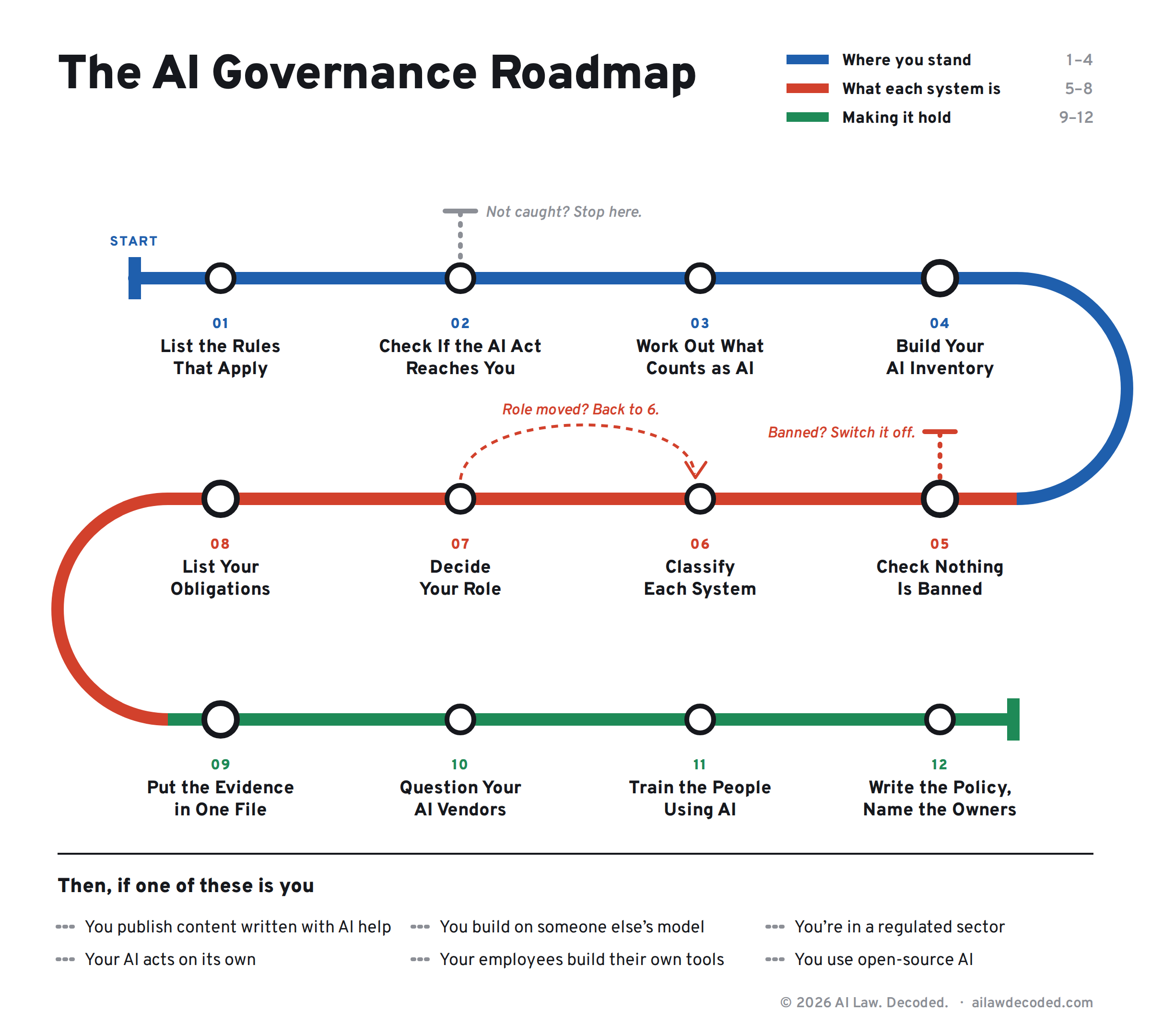
Read it like the metro map above. Twelve stops on one line, in order. Two of them can change your route: at stop 2 you find out whether the EU AI Act reaches you at all, and if it doesn't, you get off. At stop 5 you check that nothing you run is banned, and if something is, you switch it off. And there's no express train to classification.
Each step tells you what it gives you, what to read, what to do, and how to know you’re finished.
The articles are free. Under most steps you'll also find an extra resource: the working file for that step, already built. The sheet you fill in, the template you adapt, the record you keep. Those come with a paid subscription.
Before You Start
Who this is for: the person in a small or mid-size company who was handed AI governance. In-house lawyer, compliance lead, product manager, founder. You don’t need to be an AI Act specialist. That’s the point of the page.
What you need: someone in IT who can tell you what software the company runs, someone in procurement who can tell you what it bought, and permission to ask both.
How long it takes: steps 1 and 2 are an afternoon. Step 4 is the long one, because it depends on other people answering you.
Three words you’ll need before you start:
Provider. The company that develops an AI system and puts it on the market or into use under its own name.
Deployer. The company that uses an AI system under its own authority. Buying a tool and switching it on usually makes you this one.
High-risk. The category that carries the heavy obligations. Most systems are not in it, and step 6 is where you find out whether yours are.
The rest of the vocabulary is here:

Step 1: List the Rules That Apply to Your Company
What this gives you: one list of the regulations that bind every AI use in your company, before anyone argues about a specific tool.
This list comes from what the company is: its sector, its legal entities, the countries it operates in. A bank in the EU has the AI Act, DORA, the banking capital rules and the GDPR on that list. Every AI system it runs sits on top of those, whether that system is a credit model or a chatbot on the careers page.
You build this list once. It changes rarely, because the company’s identity changes rarely.
Read:

Do this:
Write down your sector, your legal entities, and the countries you operate in.
For each one, list the regulations that already apply to the company. Your Compliance/Legal has most of this.
Note which of them say anything about software, data, outsourcing or automated decisions. Those are the ones that will collide with AI first.
Keep the sources next to each entry. The list is only useful if someone else can check it.
Practical Resource:
The scope map. Every regulation that binds your company, and what each one does once AI is involved: adds an obligation, discharges one the EU AI Act would otherwise impose, or changes which authority comes asking. The piece builds both layers, with a worked example for an EU credit institution. It comes with a workbook carrying the two sheets to fill in, the banking example completed, and every EU AI Act provision that points at other law.

Move on when:
The scope map exists in writing, with sources, and your DPO or compliance lead agrees with it.
Step 2: Check Whether the EU AI Act Reaches You
What this gives you: a yes or no, per legal entity. This is the one step where a no means you stop.
Being outside the EU doesn’t settle it. A US company with European customers, an Indian services firm building a system for a European client, a UK company selling into the single market: all of them can be caught while having no EU office at all.
A group can be caught through one subsidiary and not another, so answer it per entity, not for the group.
Read:

Do this:
List your legal entities.
For each, ask: does it sell, supply or put an AI system into use in the EU?
Then ask: does it use AI, or is it established, in the EU?
Then ask: does the output of its AI end up being used in the EU, even if everything else sits elsewhere?
Write the answer and the reason next to each entity, with the date.
Extra Resource:
The reach determination. Getting to the answer is one job. Writing it down so it survives a customer's due diligence questionnaire is another, and with several entities it adds up. The reach determination works through each route in, one entity at a time, and ends with the one-page record you file when someone asks how you know. It also covers when a company outside the EU has to appoint a representative inside it.Coming soon.
Move on when:
Every entity has a written yes or no, and you know which of your entities the rest of this page applies to.
Step 3: Work Out What Counts as an AI System
What this gives you: a test you can apply to any tool in the building, so the register in step 4 contains the right things.
Some of what your vendors call AI does not meet the definition. Some of what nobody calls AI does. The label on the invoice decides nothing.
Read:

Do this:
Take three tools you already use and run the test on each one.
Write down which ones passed, which failed, and which you couldn’t decide.
Keep the undecided ones on the list. They go into the register with a question mark, not out of it.
Extra Resource:
The test is a column in the inventory sheet in step 4, with the wording you use to record the answer. You'll run this test a lot more than three times. The inventory spreadsheet in step 4 has it built in as a column, with the wording that records each answer, question marks included.
Move on when:
You can look at a tool and say yes, no, or “this needs a second look,” and explain why in one sentence.
Step 4: Build Your AI Inventory
What this gives you: one register of every AI system in the company. This is the document everything else hangs off.
You think there are four AI systems. IT knows about eleven. Procurement has a twelfth on a corporate card.
The register doesn’t create the systems. It ends the disagreement about how many there are. This step is harder than step 1, which is the reverse of what people expect.
Read:


Do this:
Ask IT for the list of software the company runs, including browser extensions and anything approved as a pilot.
Ask procurement what has been bought in the last two years with “AI,” “assistant,” “copilot,” “automation” or “analytics” in the description.
Ask each department what they use that answers questions, writes text, scores anything, or recommends a decision. Ask about free tools too.
Check the tools you already own for AI features that were switched on in an update, rather than bought.
For each system, record: name, vendor, who owns it internally, what decision it touches, what data goes into it, and whether anyone modified it.
Give the register one owner and a review date.
Extra Resource:
The inventory spreadsheet. A register started from a blank sheet usually gets its columns redesigned at least once, right after the first answers come back. This one has the columns above already set up, a definition for each so two departments fill them in the same way, and the discovery questions that get useful answers out of IT and procurement. Asking IT "do we use AI?" gets you a very short answer. Coming soon.
Move on when:
One register exists, one person maintains it, and the teams that each kept their own list are now using it.
Step 5: Check Nothing You Run Is Banned
What this gives you: confirmation that nothing on your register falls into the practices the EU AI Act prohibits outright. This is the shortest step and the only one where the answer means stop using the system, not document it.
Do it before the full classification, for two reasons. The ban applies now, while the high-risk obligations are still ahead. And the consequence is different in kind: everywhere else you write something down, here you switch something off.
Read:

Do this:
Take the register from step 4 and go through the banned practices against every system on it, including the ones you’re confident about.
Pay attention to what a system does in practice rather than what it was bought for. The ban follows the effect.
Where a system comes close, write down why you concluded it’s on the right side of the line.
Record the check itself: which systems, which date, who did it.
Extra Resource:
The screening record. The screening itself doesn't take long. Showing later that you did it is harder when all that's left is a calendar invite. The screening record is one page per system: what was checked, what you found, and when. It's the answer to "did you ever assess this," which is a question with only two possible answers and one good one. Coming soon.
Move on when:
Every system on the register has been screened, and the screening is written down rather than remembered.
Step 6: Classify Each System
What this gives you: a category for every system that survived step 5: high-risk, one that only needs to be transparent about what it is, or one with no specific obligations.
Classify the system as it is actually used, not as the vendor describes it. The same tool can land in two different categories at two different companies.
Read:


Do this:
For each system, ask what it decides and about whom. Employment, credit, education, essential services, insurance pricing and law enforcement are the areas where the high-risk category lives.
Ask separately whether it talks to people or generates content, which brings its own duty to say so.
Check when the system was first put into use. For older systems, whether the high-risk rules reach them at all is a separate question with its own answer.
Write the category, the reason and the date next to each system on the register.
Extra Resource:
The classification worksheet. Classification decisions get made in a meeting and questioned a year later, by someone who wasn't in it. The worksheet takes you through the questions in order, includes the filter that takes some systems back out of high-risk, and gives you the wording for a decision that still makes sense to that person. Coming soon.
Move on when:
Eery system on the register has a category, a reason and a date.
Step 7: Decide Your Role for Each System
What this gives you: provider or deployer, per system. Your obligations come from this, not from the size of your company.
Run as sold, tuned to your specification, shipped under your own name, wired into your own data. Some of those change your role and some don’t, and the size of the behavior change is not the test.
If a modification makes you the provider, go back to step 6 for that system. The category can change with the role.
Read, in this order:


Do this:
For each system, ask whether you are running it as the vendor sold it.
Ask whether your name goes on it when someone uses it.
Ask what you changed: settings, training data, the purpose it’s used for.
Ask whether you are supplying it to anyone outside your company, including other group entities.
Write the role next to the category on the register, with the facts you relied on.
Extra Resource:
The role assignment record. "We decided we're a deployer" is a conclusion, and anyone checking it will ask for the reasoning. The record captures which facts you tested, which way each one pointed, and where the line sits. When the vendor ships an update or your team adds a feature, you can see straight away whether your role moved. Coming soon.
Move on when:
Each system has a role, and you know which changes to it would move that role.
Step 8: List Your Obligations
What this gives you: for each system, a short list of obligations and dates. Category plus role gives you the list.
The dates keep moving, which is why this step comes with a tracker rather than a fixed calendar.
Read:


Do this:
Take each system’s category and role, and write down what that combination requires.
Put a date next to each item. Some of those dates have already passed, and some are years away.
Mark which items you can do yourself and which need the vendor.
Put the vendor items into your next contract conversation. The vendor section below covers those.
Extra Resource:
The obligations matrix. These dates have already moved once by amendment, and a list you built in spring can be wrong by autumn without you touching it. The matrix puts role down one side and category across the top, with the dates in the cells, and I update it when the dates move. You check the matrix instead of rereading the amendments. Coming soon.
Move on when:
Each system has its list, and the items with dates already behind you are flagged.
Step 9: Put the Evidence in One File
What this gives you: the answer you hand over when a customer’s security team, your DPO or an authority asks how you decided.
Work nobody wrote down didn’t happen, as far as anyone asking is concerned.
Do this:
Put the outputs of steps 1 to 8 in one place, dated.
Note who decided what, and when.
Set a review date. Quarterly works for a small estate.
Write down the questions you couldn’t answer. Open questions with an owner are a better position than silence.
Extra Resource:
The documentation pack. This is the step that gets skipped, because once the thinking is done it feels like admin. The pack tells you what to keep, in what form, and for how long, so the file you hand over shows how you decided, not just that you did.Coming soon.
Move on when:
The file exists, someone owns it, and a person from outside your team could follow it.
Step 10: Question Your AI Vendors Before You Sign
What this gives you: each vendor’s answers in writing, in the contract or next to it.
Roles are not allocated by contract. They follow what each party actually does, which is why the questions come before signature rather than after.
Read:

Do this:
Send the questions before the demo, not after the contract is drafted.
Get the answers in writing, in the contract or an annex to it.
Add the system to your register on the day you sign, not the day it goes live.
Extra resource:
The full twenty questions. The article gives you five. For each of the twenty: why it matters, what a good answer sounds like, what an evasive answer sounds like, and what you need in writing. Built for procurement, not for a seminar. A document you forward, rather than an email you write from scratch every time, in a hurry, on a Friday. Coming soon.
Move on when:
Every AI vendor you’re signing or renewing with has answered in writing, and the answers sit in the contract or an annex to it.
Step 11: Train the People Using AI on Your Behalf
What this gives you: a record that the people using AI on your behalf know what they’re doing with it. Contractors and outsourced teams count.
This one doesn’t wait for the rest of the list. It has applied since February 2025, and it applies even if none of your systems are high-risk.
Read:

Do this:
List who uses AI in the company, and for what.
Match the training to what each group actually does. The person building a model and the person pasting text into a chatbot don’t need the same session.
Record what was delivered, to whom, and when.
Extra resource:
AI literacy documentation. Training is easy to run and surprisingly hard to evidence afterwards. This shows what a defensible record looks like, sized three ways (startup, mid-size, large), and it’s written against the text as amended in July 2026, which a lot of the guidance still isn’t. Coming soon.
Move on when:
Each group that uses AI has had training matched to what it does, and the record says who, what and when.
Step 12: Write the AI Policy and Name the Owners
What this gives you: the internal rules in one place, and a name next to each part of the work.
Once the list from step 1 and the register from step 4 exist, the things no one owns become visible. In my experience people stop disputing them and start avoiding eye contact. Assigning owners takes someone senior making it non-optional, and no document does that part for you.
Read:

Do this:
Write down who decides whether a new AI tool can be bought.
Write down who maintains the register, who classifies, and who signs off.
Put the rules people actually need in one short policy, and nothing else.
Extra resource:
The AI policy template. AI policies tend to grow a rule per meeting. The template shows what has to be in yours, what’s optional, and what people put in that does nothing except create obligations they then breach. It comes with a checklist of everything that belongs in a complete setup, so you can see what you have, what you’re missing, and what you can defensibly skip. Coming soon.
Move on when:
The policy exists, it’s short, and every part of the work has a name next to it.
If One of These Is You
The twelve steps apply to every company. These don't. Read the ones that describe you and skip the rest
If You Publish Content Written With AI Help
Since 2 August 2026, the AI Act's transparency rules apply to AI that talks to people or produces content, whatever its risk level. The AI Act splits the work between the company that builds the system and the company that uses it.
Providers carry two duties: design a chatbot so people know they're talking to AI, unless that's obvious, and mark the output of systems that generate images, audio, video or text in a machine-readable way (systems already on the market before August 2, 2026 have until December 2, 2026 for the marking).
Deployers carry the rest. They tell people when they're exposed to emotion recognition or biometric categorization, disclose deepfakes, and label AI-generated text published to inform the public on matters of public interest, unless a person reviewed it and someone holds editorial responsibility for it. None of this is exempt. A chatbot launched in 2023 is in scope now.
Read:

If You Build on Someone Else’s Model
A general-purpose model like GPT 5 or Sonnet isn't an AI system on its own. Once you build an interface, a purpose and a workflow around it, you have a system, and your company is its provider, even if the tool never leaves your building. The obligations that belong to the model itself, like its technical documentation and training data summary, stay with the company that trained it. However, fine-tuning can change that.
Under the European Commission's guidelines, if the compute you spend fine-tuning exceeds a third of the compute used to train the original, expect to be treated as a model provider as well, on top of being the system provider. And if you're a financial entity, the model you depend on is also a third-party risk under DORA, as the Fable 5 shutoff showed in a single evening.
Read:


If You’re in a Regulated Sector
If you are in a regulated sector, your sector stacks its own rules on top, and those often bite before the AI Act does. The AI Act lists some sector uses as high-risk: credit scoring of individuals (fraud detection excepted), risk assessment and pricing in life and health insurance, and AI used to recruit and manage workers. For those, the high-risk regime applies from December 2, 2027, with separate rules for systems already running before then.
Your sector rules don't wait for that date. Automated credit decisions already fall under the GDPR, and banks and insurers already answer to their supervisors for the models they run.
Read:

Insurance, HR and recruitment, and healthcare come next, one at a time.
If Your AI Acts on Its Own
Agents don't get their own category in the AI Act. An agent is classified like any other AI system, by what it does, so an agent that screens job candidates is high-risk and one that books meeting rooms isn't. The hard part is oversight.
High-risk systems have to be built so a person can override or reverse the output and stop the system. That works when the output is a recommendation waiting for approval. When the output is an email that's already gone out, the check has to happen before the action, not after it. Giving a general-purpose agent a high-risk job can also make you its provider.
Read:

If Your Employees Build Their Own Tools
Personal use is outside the AI Act only when it's purely personal and non-professional. An agent an employee builds for their own work isn't that, so the company is its deployer from the first day it's used for work.
If the agent does something low-risk, the obligations are modest: AI literacy for the people using it, and the transparency rules once its output reaches people outside the company. The risk sits in the job the agent is given. An agent that pre-screens CVs is high-risk, and a company that points a general-purpose tool at that job can become its provider, with the full set of provider obligations.
Read:
If You Use Open-Source AI
The AI Act exempts AI systems released under free and open-source licenses, unless the system is high-risk, prohibited, or caught by the transparency rules. However, models are treated separately.
An open-source general-purpose model with its weights published skips some of the documentation duties, but its provider still needs a copyright policy and a public summary of the training data, and the exemption doesn't apply to models big enough to carry systemic risk. The license also has to be open in substance.
The European Commission's guidelines (which aren't binding) say a license that restricts commercial use, or requires a separate license above a certain number of users, doesn't qualify, and at least one widely used open-weight license has exactly that clause. Read the license, not the announcement.
Read:

Read Also
If you want the background: how AI regulation in the EU developed, and my take on where Europe stands on AI adoption and regulation today.


Who Am I
I’m an AI regulatory lawyer. Six years at Amazon, where I led a GenAI contract review project that the Wall Street Journal covered. I now build the AI governance framework inside a regulated financial institution.
I’m not writing about this from the outside. I’m working through the same questions, against the same deadlines, from the same half-finished guidance you are.
The steps on this page are the questions readers keep sending me, in the order they need answering.
Free or Paid
Everything you need to work down this page is free, and it stays free.
The paid version is the same path with the files already built: the register, the worksheets, the templates, the records. You fill them in instead of designing them, and I keep them current as the law moves. Each document carries the date it was last checked, arrives as a file you download and keep, and stays yours if you cancel.
$30 a month, or $300 a year. For a team that wants to circulate the documents inside the company, $600 a year, with the license stated in writing so it can sit in the file next to the documents.
If you’re twenty people running one off-the-shelf tool, don’t subscribe. You need a page and a decision, not a program, and the free articles will get you there.
For the expense claim, if you need one: a maintained regulatory reference for our EU AI Act obligations, covering which regulations apply to us, role classification per system, and vendor due diligence for procurement. Updated as guidance changes. $300 a year, which is roughly one hour of external counsel.
Still Need Help?
If your AI estate is large and properly chaotic, hire someone. I’ll say so if you ask me.
If you’re stuck on a step, or you want to ask me something that isn’t on this page: silvia@ailawdecoded.com.
These documents are information, not legal advice. Reading them creates no lawyer-client relationship, and you apply your own judgment to your own situation. They are independently authored, written outside my employment and unconnected to any employer’s work product.